 How-to
Managing Back Pain While Working: A 2026 Desk Guide
Table of Contents
- Why Sitting All Day Makes Back Pain Worse
- Ergonomic Desk Setup for Back Pain: A Step-by-Step Fix
- Exercises for Lower Back Pain at Work: A Daily Routine
- Chronic Back Pain Treatment Options: From Self-Care to Professional Care
- How the McKenzie Method Helps Managing Back Pain While Working
- The Mental Toll: How Chronic Pain Affects Focus and Productivity
- When to See a Specialist for Back Pain That Won't Quit
- Frequently Asked Questions
Last Updated: September 24, 2026
Why Sitting All Day Makes Back Pain Worse
Managing back pain while working starts with understanding what prolonged sitting does to your spine. When you sit for hours, the discs in your lower back stay compressed, your hip flexors tighten, and the muscles that support your spine weaken from disuse. That combination sets off a chain reaction: stiffness, muscle tension, and eventually the nagging ache that follows you home.
The problem isn't sitting itself. It's sitting still.
Your spine needs movement to stay healthy. The discs between your vertebrae act like sponges. They absorb nutrients when you move and lose them when you stay parked in one position. A sedentary lifestyle slowly starves those discs of what they need.
Many people don't realize their chair is working against them. A seat that's too high, too low, or too soft changes the curve of your lower back. That throws off spinal alignment and loads pressure onto the wrong spots.
At Spinal Haven, we see this pattern constantly. People come in after months of "pushing through" the discomfort, and the fix often starts with simple changes to how they sit.
Ergonomic Desk Setup for Back Pain: A Step-by-Step Fix
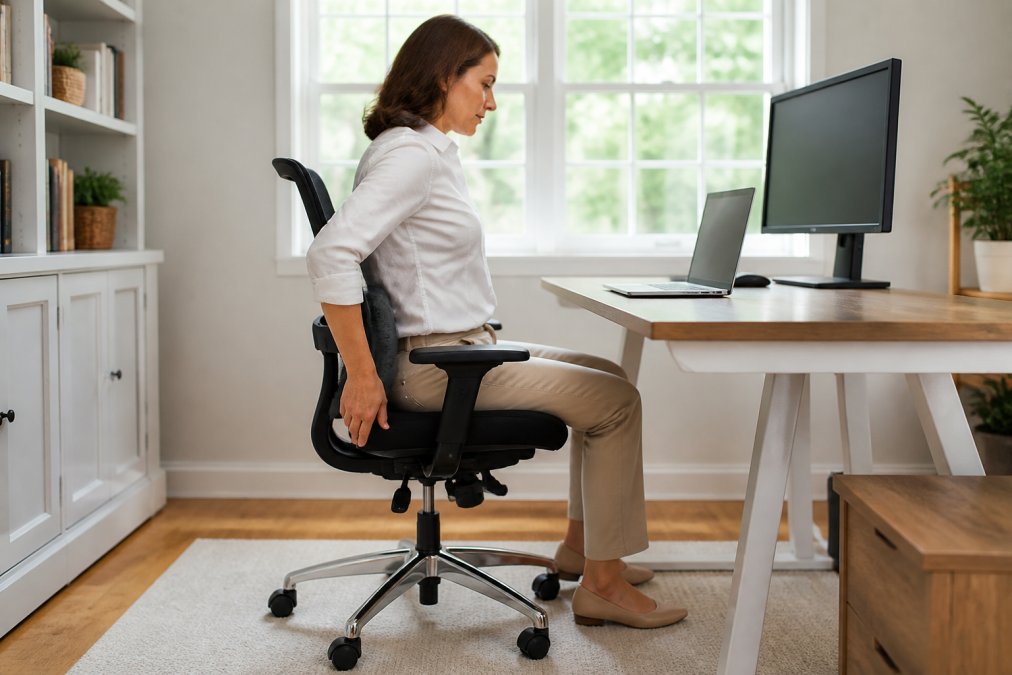
An ergonomic desk setup for back pain follows five basic steps. Get these right and you remove the daily strain that keeps your back irritated.
Step 1: Set your chair height. Your feet should rest flat on the floor. Your knees should sit at or slightly below hip level. If your feet dangle, use a footrest.
Step 2: Support your lumbar curve. Your lower back has a natural inward curve. A small cushion or the chair's built-in lumbar support should fill that gap. Aim for support at the belt line, not higher.
Step 3: Position your monitor at eye level. The top of the screen should sit at or just below your eyeline. This stops you from craning your neck forward, which pulls on your upper back.
Step 4: Bring your keyboard and mouse close. Your elbows should stay near 90 degrees, with wrists straight. Reaching forward all day loads your shoulders and neck.
Step 5: Keep your screen an arm's length away. Too close and you hunch. Too far and you lean in.
Budget-Friendly Adjustments You Can Make Today
You don't need a pricey chair to improve your setup. A rolled towel behind your lower back works as a lumbar roll. A stack of books lifts your monitor to eye level. A box under your desk becomes a footrest.
The Occupational Safety and Health Administration's computer workstation guidance outlines these same principles for reducing strain at a desk.
Exercises for Lower Back Pain at Work: A Daily Routine
Exercises for lower back pain at work do not require a gym or a spare hour. But if you split your week between a corporate office and a home setup, a single routine will not cut it. Your chair, desk height, and even your floor surface change, and your back feels the difference. The fix is a routine that adapts to where you are.
Start with a core sequence you can do anywhere, then layer on environment-specific adjustments.
The universal sequence (do twice daily):
- Standing extension: Stand, place your hands on your lower back, and gently lean backward 10 times. This counteracts the forward flexion that desk work reinforces.
- Seated cat-camel: Sit tall, round your spine forward, then arch gently back. Repeat 10 times. This keeps spinal joints lubricated without leaving your chair.
- Hip flexor stretch: Step one foot forward into a small lunge. Hold 20 seconds per side. Tight hip flexors from prolonged sitting pull on your lower back; this releases them.
- Shoulder rolls: Roll your shoulders back 10 times to release tension that creeps up from a fixed mouse position.
- Neck turns: Slowly turn your head left and right 5 times each way. This prevents the stiffness that turns into a tension headache by 3 p.m.
Move slowly. Stop if anything sharpens the pain.
For the office:
Corporate chairs are often more adjustable than home setups, so use that to your advantage. Set a reminder to stand during phone calls. Walk to a farther restroom or water station. If you have a private office, close the door and do the standing extension sequence once in the morning and once after lunch. If you are in a cubicle, the seated cat-camel and neck turns are invisible to coworkers.
For home:
Home is where the worst habits hide. Kitchen chairs, couches, and beds become makeshift desks. If you work from a kitchen chair, put a firm cushion behind your lower back and a box under your feet. Do the hip flexor stretch before you sit down, not after pain starts. If you work from a couch, you are fighting a losing battle; move to a table at least for your heaviest work blocks.
The transition day problem:
The hardest day is the one where you switch environments. Your back is used to one setup, then you change everything. On transition days, add an extra micro-break every 30 minutes for the first two hours. This gives your spine time to adapt before stiffness sets in.
Micro-Breaks and Movement Snacks That Fit Your Schedule
Micro-breaks are short movement pauses built into your workday. They take under two minutes and break up prolonged sitting before stiffness sets in.
Set a timer every 30 to 45 minutes. Stand up. Walk to refill your water. Do a few standing extensions. Then sit back down. The specific movement matters less than the frequency. Your discs rehydrate and your muscles reset with every position change.
These small breaks add up.
Chronic Back Pain Treatment Options: From Self-Care to Professional Care
Chronic back pain treatment options range from self-care habits to hands-on professional care. The right path depends on how long you've had symptoms and what's driving them.
Self-care includes:
- Daily stretching and movement breaks
- Heat or ice for flare-ups
- Over-the-counter pain relief as directed
- Sleep and stress management
How the McKenzie Method Helps Managing Back Pain While Working
The McKenzie Method helps managing back pain while working by teaching you to read your own symptoms and respond to them. Instead of passive treatments, it puts you in control.
The Mental Toll: How Chronic Pain Affects Focus and Productivity
Finally, consider the emotional weight of working while in pain. Many professionals feel they must hide it to appear capable. That concealment is exhausting. Finding one trusted colleague or a professional to talk to can reduce the isolation that makes pain feel worse. You do not need to broadcast your condition, but you do need an outlet that is not your own head.
When to See a Specialist for Back Pain That Won't Quit
See a specialist when back pain lasts more than a few weeks, keeps returning, or limits your daily activities. Early assessment often prevents a small problem from becoming a long-term one.
Watch for these signs:
- Pain that spreads down your leg
- Numbness, tingling, or weakness
- Pain that wakes you at night
- Symptoms that don't improve with rest and basic self-care
| Sign or Symptom | What It May Suggest | Next Step |
|---|---|---|
| Pain lasting 2-3 weeks | Muscle or joint strain | Self-care, then assess |
| Pain down the leg | Possible nerve irritation | Get evaluated |
| Numbness or weakness | Nerve involvement | See a specialist soon |
| Pain that wakes you | Ongoing inflammation | Book an assessment |
Frequently Asked Questions
How do I get my back to stop hurting while working?
Start by adjusting your chair so your feet rest flat and your lower back is supported. Take a micro-break every 30 minutes to stand and stretch. If pain persists beyond two weeks or radiates into your legs, see a physical therapist who can assess your movement patterns and build a plan specific to your body.
What are the most effective exercises for lower back pain at work?
Simple movements you can do at your desk work best. Try seated pelvic tilts, standing extension stretches, and a short walking break every hour. A physical therapist trained in the McKenzie Method can teach you directional exercises matched to your symptoms, which tend to work better than generic stretching routines.
How does the McKenzie Method help with work-related back pain?
The McKenzie Method uses repeated movements and positions to identify what reduces your specific pain. A trained clinician guides you through a mechanical assessment, then gives you exercises you can do at your desk or at home. The goal is self-management, so you rely less on ongoing appointments and more on a routine you control.
Should I keep working if my back hurts?
In most cases, staying active and continuing light work is better than bed rest. Modify your setup, take frequent movement breaks, and avoid heavy lifting. If pain worsens, limits your ability to sit or stand, or comes with numbness or weakness, contact a healthcare provider before pushing through.
Back pain that follows you from desk to desk doesn't have to be your normal. The right mix of ergonomic fixes, daily movement, and expert guidance can change how your back feels at work and beyond. Spinal Haven helps active adults find the root cause of their pain through one-on-one care, movement-based assessment, and practical self-management tools you can use for life. Book a discovery call with Spinal Haven and start moving with confidence again.