 How-to
Workplace Posture Assessment: A Professional's Guide
Last Updated: November 12, 2026
Quick Summary
A workplace posture assessment is a structured review of how your body sits, reaches, and moves through a workday, starting with measurements of your chair, desk, monitor, and keyboard before you adjust anything. Discomfort at a desk often traces back to workstation setup more than posture alone, so you fix the desk before you fix the body.
- Record chair, desk, monitor, and keyboard heights before changing anything, then adjust one variable at a time.
- A common viewing distance is 20 to 40 inches, or about an arm's length from your eyes to the screen.
- Many professionals sit for 90 to 120 minutes without a break, so track sitting duration with a timer.
- Recheck your measurements and symptoms after one week, then again after four weeks.
- If discomfort does not improve after two to three weeks of consistent changes, consider a professional assessment.
Table of Contents
- Why Workplace Posture Assessment Matters for Busy Professionals
- Your Ergonomic Assessment Checklist: What to Review Before You Adjust Anything
- An Ergonomic Assessment Example: A Day at the Desk, Step by Step
- Posture Assessment Tools for Office Workers: What to Use and What to Skip
- Ergonomics in the Workplace Examples: Matching the Setup to the Work
- Common Posture-Related Symptoms Professionals Should Not Ignore
- When to Move From Self-Assessment to a Professional Posture Assessment
- Book a Discovery Call With Spinal Haven
- Frequently Asked Questions
Why Workplace Posture Assessment Matters for Busy Professionals
The research backs the stakes. A 2025 scoping review mapped the ergonomic assessment methods used to evaluate prolonged sitting among office workers (Prolonged sitting in office environments scoping review(https://pmc.ncbi.nlm.nih.gov/articles/PMC13144663/)).
Here is the part most guides get wrong. Discomfort at a desk often traces back to workstation setup more than posture alone, according to Contour Design's workplace assessment resource.
Below, we walk through a full self-assessment you can run this week, plus the signs that mean it is time for professional help.
Your Ergonomic Assessment Checklist: What to Review Before You Adjust Anything
An ergonomic assessment checklist works best when you gather information first and adjust second.
Before you adjust anything, record these numbers:
- Chair height: When seated, your feet should rest flat on the floor with your knees at roughly 90 degrees. Measure from the floor to the top of your seat pan. A common target is 16 to 21 inches, but your leg length determines the right number.
- Desk height: With your shoulders relaxed and elbows at about 90 degrees, your forearms should be parallel to the floor. Measure from the floor to the top of your desk. Most sit-stand desks adjust between 24 and 50 inches; fixed desks often sit at 29 to 30 inches, which is too high for many shorter professionals.
- Monitor height and distance: The top of your screen should be at or slightly below eye level when you sit tall. Measure from the floor to the center of your screen and from your eyes to the screen. A common viewing distance is 20 to 40 inches, or about an arm's length.
OSHA identifies job analyses, workplace surveys, and worker interviews as common methods for spotting ergonomic risks (OSHA ergonomics problem identification(http://www.osha.gov/ergonomics/identify-problems)).
A practical sequence for professionals:
- Measure first. Record chair, desk, monitor, and keyboard heights before changing anything.
- Photograph your setup from the side and front.
- Log symptoms for three workdays to spot patterns.
- List your most repeated tasks (typing, mouse work, phone calls, lifting) and note the postures they demand.
- Adjust one variable at a time and recheck after a week.
Role-specific checks for hybrid and remote professionals:
- Hybrid worker: Measure both your home and office setups. A common pattern is a well-adjusted office chair and a kitchen table at home. Match the two as closely as you can, and photograph both.
- Remote knowledge worker: Treat your home desk as a permanent station. Measure it the same way you would an office desk, and avoid laptop-only work for long stretches.
- Frequent traveler: A laptop riser and a separate mouse are the minimum. Measure the riser height so the screen top is near eye level, and set a hard rule against working from your lap.
Accessibility and individual variation: Body size, pregnancy, injury history, and assistive technology change what “neutral” means.
Follow-up and reassessment plan: After you adjust, recheck your measurements and symptoms in one week, then again in four weeks. Prioritize the change that addresses your most frequent symptom. If discomfort does not improve after two to three weeks of consistent changes, that is a signal to consider a professional assessment rather than continuing to tweak blindly.
Here are the baseline measurements and targets the checklist asks you to record before changing anything.
| Item | Target or value | Note |
|---|---|---|
| Chair height | 16 to 21 inches floor to seat pan | Leg length determines the right number |
| Desk height | Sit-stand desks adjust 24 to 50 inches | Fixed desks often 29 to 30 inches, too high for shorter professionals |
| Monitor height | Top of screen at or slightly below eye level | Measure floor to screen center |
| Viewing distance | 20 to 40 inches, about an arm's length | Measure eyes to screen |
| Keyboard and mouse | Elbows near 90 degrees, wrists straight | Mouse within easy reach, not at desk edge |
| Sitting duration | Many sit 90 to 120 minutes without a break | Track with a timer or phone note |
| Symptom log | One week | More useful than a single snapshot |
| Photographs | Side and front, same time of day | Reveal slumping and reach distances |
An Ergonomic Assessment Example: A Day at the Desk, Step by Step
Here is an ergonomic assessment example you can follow from morning to afternoon. Total time: about 30 minutes spread across the day.
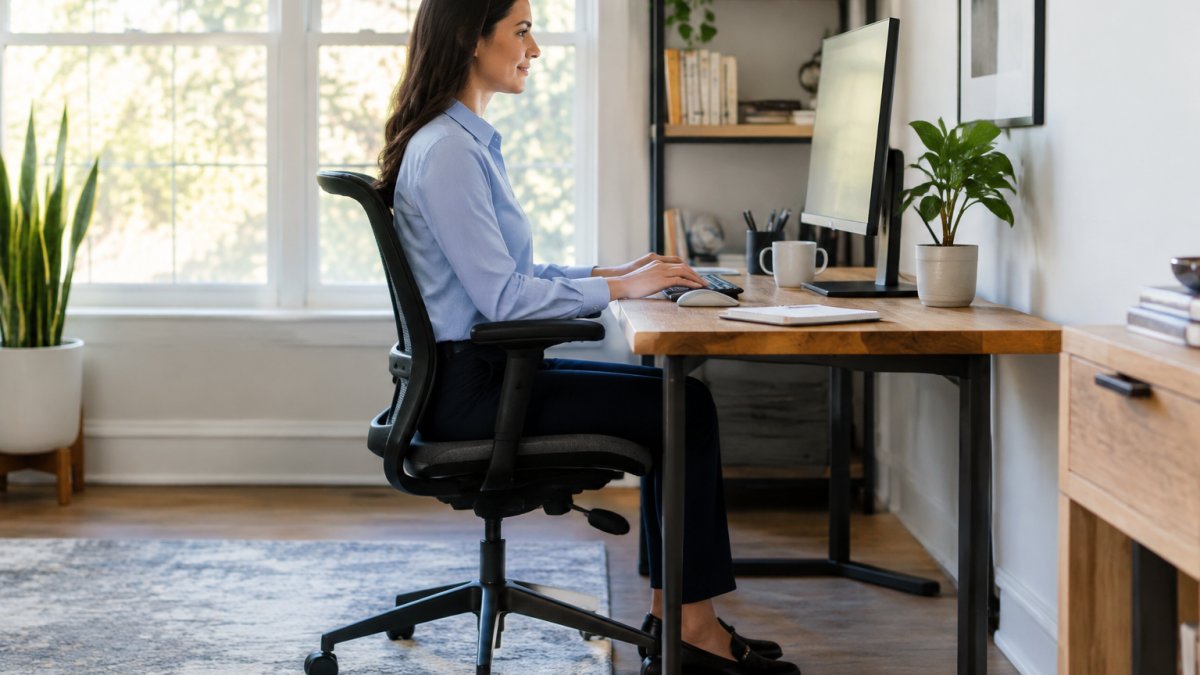
- Morning check (5 minutes). Sit down and notice where you land. Feet flat? Hips level? Shoulders relaxed?
- Mid-morning photo (2 minutes). Have someone photograph you from the side while you type normally.
- Monitor check (5 minutes). Screen top near eye level, about an arm's length away.
- Keyboard and mouse check (5 minutes). Elbows near 90 degrees, wrists straight, mouse close to the body.
- Movement audit (throughout). Note every stretch of sitting longer than an hour.
- Afternoon recheck (5 minutes). Ask whether your setup drifted. Most people slump by 2 p.m.
If rounded shoulders show up in your photos, our guide on how to fix rounded shoulders from desk work walks through the correction in more detail.
Posture Assessment Tools for Office Workers: What to Use and What to Skip
Posture assessment tools for office workers range from free phone photos to clinician-led movement screens, and most professionals need far less than they think.
NIOSH recommends assessing working posture as part of a broader evaluation rather than judging posture in isolation (NIOSH working posture assessment bulletin(https://www.cdc.gov/niosh/bulletin/2014/posture-assessment.html)).
What to use, and how to use it:
- Tape measure: Measure chair height (floor to seat pan), desk height (floor to desktop), monitor height (floor to screen center), and viewing distance (eyes to screen). Record the numbers so you can compare after adjustments. A common target for viewing distance is 20 to 40 inches, or about an arm's length.
- Side-view photos: Take a photo from the side while you type normally. Look for rounded shoulders, forward head, and whether your feet are flat. Repeat at the same time of day for comparison.
- Symptom log: Keep a one-week log of where and when discomfort starts. This turns vague feelings into patterns you can act on.
What to skip:
- Gadgets that buzz when you slouch: These treat a symptom, not the cause. They can also create hypervigilance without changing your setup.
- Self-diagnosis from an app alone: An app cannot assess movement quality, strength, or control under load.
- Buying equipment before you know the cause: A new chair will not fix a monitor that is too high or a mouse that is too far away.
Objective targets for common measurements:
- Screen height: Top of the screen at or slightly below eye level when you sit tall.
- Viewing distance: About 20 to 40 inches, or roughly an arm's length.
- Chair fit: Feet flat on the floor, knees near 90 degrees, and the seat pan not pressing into the back of your knees.
Watch out: Relying on a single photo or a one-time measurement can mislead you.
If your assessment points to stiffness and movement limits rather than setup alone, mobility and movement restoration is where that work starts.
Ergonomics in the Workplace Examples: Matching the Setup to the Work
Ergonomics in the workplace examples look different by role, and that is the piece generic advice misses. A hybrid schedule means two setups, not one. Remote work means nobody adjusts your chair but you.
- Hybrid professional: match your home and office setups as closely as possible, and photograph both.
- Remote knowledge worker: treat your home desk as a permanent station, not a kitchen table.
- Frequent traveler: laptop riser, separate mouse, and a hard rule against laps.
Awkward postures and repetitive movements are among the most common ergonomic risk factors, and they follow professionals into every work environment.
Common Posture-Related Symptoms Professionals Should Not Ignore
Neck pain, back pain, and shoulder pain that appear on workdays and fade on weekends are a signal, not a coincidence.
Symptoms worth acting on:
- Stiffness in the neck or upper back within an hour of sitting
- Headaches that start during screen work
- Numbness or tingling in the hands or fingers
Seek prompt medical attention for numbness that does not resolve, weakness in an arm or leg, pain after a fall, or any loss of bladder or bowel control.
For persistent neck stiffness and related headaches, neck pain physical therapy explains how targeted movement care addresses the cause.
When to Move From Self-Assessment to a Professional Posture Assessment
Self-assessment has a ceiling. When symptoms persist past a few weeks, keep returning, or limit your training and daily life, a professional posture assessment finds what a photo cannot.
A clinician can assess movement patterns, strength, and control under load. Our Selective Functional Movement Assessment is a systematic screen that looks for the root cause of pain rather than the spot where it hurts.
Signs it is time to escalate:
- Symptoms lasting more than two to three weeks
- Relief that disappears once you stop stretching
- Pain that limits exercise, lifting, or sleep
- A history of failed general physical therapy
Book a Discovery Call With Spinal Haven
Most professionals do not need more appointments. They need a clear answer about what is driving their symptoms and a plan they can run themselves.
Spinal Haven offers one-on-one physical therapy built on the McKenzie Method® and the Selective Functional Movement Assessment (SFMA). Our owner, Dr.
You can schedule your one-on-one evaluation as a 15-minute discovery call to see whether this approach fits your situation.
Your desk setup is fixable, and so is the strain it creates.
Frequently Asked Questions
What is a workplace posture assessment?
A workplace posture assessment is a structured review of how you sit, stand, and move during your workday. It combines direct observation, a checklist of your workstation setup, and questions about discomfort and work habits. The goal is to find ergonomic risk factors such as awkward postures, sustained positions, and repetitive movements before they turn into musculoskeletal symptoms. A good assessment ends with specific ergonomic recommendations, not just a list of problems.
What should an ergonomic assessment checklist include?
A practical ergonomic assessment checklist covers chair adjustment (seat height, back support, armrests), desk height, monitor position (top of screen near eye level, about an arm's length away), keyboard and mouse position (elbows near 90 degrees, wrists neutral), and foot support. Add items for lighting, glare, and how often you change position. Include a section for symptoms such as neck pain, back pain, or shoulder pain, and note when they appear during the day. This gives you a baseline to compare against after adjustments.
Can poor desk posture cause neck and back pain?
Desk posture is one contributor to neck and back pain, but it is rarely the only one. Prolonged sitting, sustained posture, and repetitive tasks all add load to the spine and surrounding muscles. A 2025 scoping review examined ergonomic assessment methods for prolonged sitting among office workers, and NIOSH guidance recommends evaluating posture as part of a broader assessment rather than in isolation. If pain persists despite setup changes, a clinician can help identify whether movement patterns, strength, or other factors are involved.
When should you seek a professional posture assessment?
Seek a professional posture assessment when discomfort lasts more than a few weeks, keeps returning after you adjust your workstation, or starts limiting your exercise, sleep, or work. Also seek care if you notice numbness, tingling, or weakness. A physical therapist can perform a movement-based assessment to identify the root cause rather than treating symptoms alone. Spinal Haven offers one-on-one evaluations, in person or virtual, for professionals who want a plan tailored to their work and goals.